Bluetooth Receipt Printer - Fast & Reliable Printing
- meenakshiarorastor
- Apr 5
- 4 min read
In today’s fast-paced business environment, efficiency and mobility are more important than ever. Whether you run a retail store, restaurant, delivery service, or small business, having the right tools can significantly impact your operations. One such essential device is the Bluetooth receipt printer—a compact, wireless solution designed to deliver fast and reliable printing without the hassle of cables.
This article explores everything you need to know about Bluetooth receipt printers, including their features, benefits, applications, and tips for choosing the best one for your business.
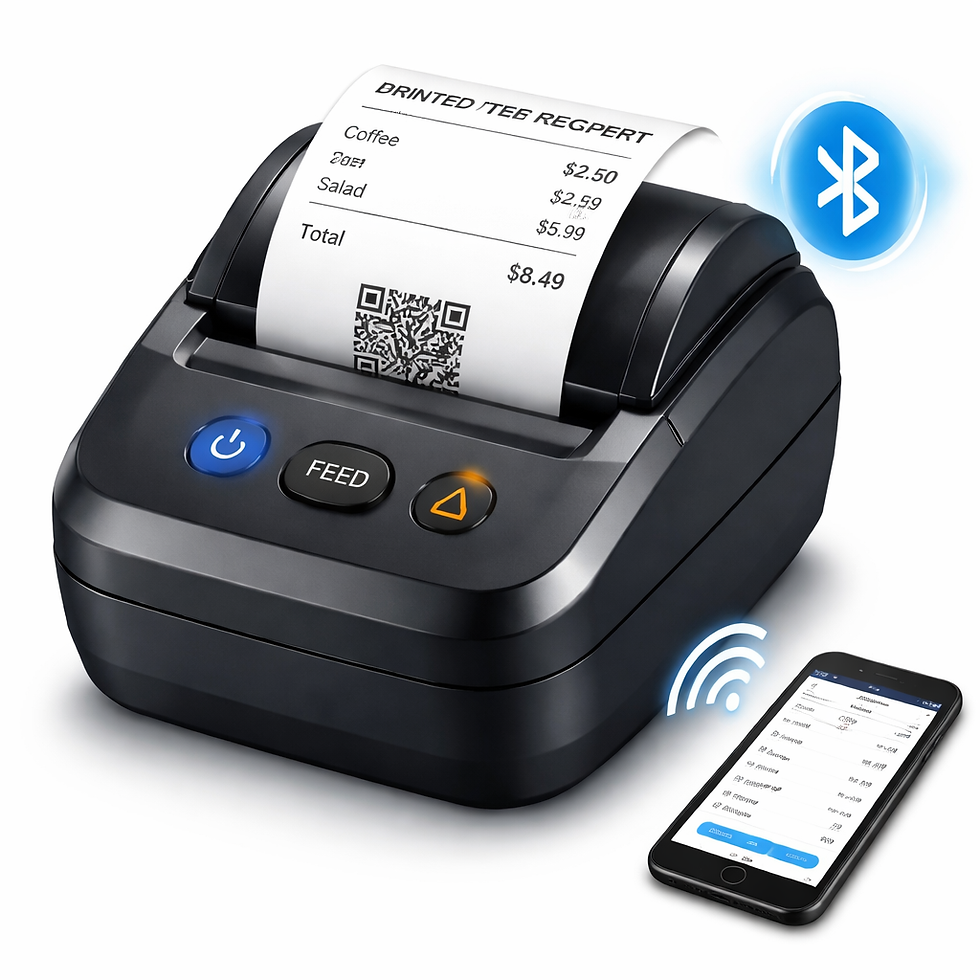
What is a Bluetooth Receipt Printer?
A Bluetooth receipt printer is a portable or stationary printing device that connects wirelessly to smartphones, tablets, or computers using Bluetooth technology. Unlike traditional printers that require wired connections, these printers allow seamless communication between devices, making them ideal for mobile and on-the-go operations.
They are commonly used to print receipts, invoices, order slips, tickets, and transaction records quickly and efficiently.
Key Features of Bluetooth Receipt Printers
1. Wireless Connectivity
The most defining feature is Bluetooth connectivity. It eliminates the need for messy cables and allows easy pairing with Android, iOS, and Windows devices.
2. Compact & Portable Design
Most Bluetooth receipt printers are lightweight and compact, making them perfect for businesses that require mobility, such as food delivery or field services.
3. Fast Printing Speed
Modern Bluetooth printers offer high-speed printing, typically ranging from 50 mm/s to 150 mm/s or more. This ensures quick transaction processing, reducing customer wait times.
4. Thermal Printing Technology
Most models use thermal printing, which does not require ink or toner. Instead, they use heat to print on special thermal paper, making them cost-effective and low maintenance.
5. Long Battery Life
Portable models come with rechargeable batteries that can last several hours or even days on a single charge, depending on usage.
6. Compatibility
Bluetooth receipt printers are compatible with POS (Point of Sale) systems, billing apps, and various software platforms, making integration easy.
Benefits of Using a Bluetooth Receipt Printer
1. Enhanced Mobility
Bluetooth printers allow you to print receipts anywhere within range. This is especially useful for delivery personnel, pop-up shops, and outdoor events.
2. Improved Customer Experience
Faster billing and instant receipt generation lead to shorter queues and better customer satisfaction.
3. Cost-Effective Operation
With thermal printing technology, there’s no need to buy ink or toner, significantly reducing operating costs.
4. Easy Setup & Use
Pairing a Bluetooth printer is simple and usually takes just a few seconds. Most devices come with user-friendly apps and drivers.
5. Space Saving
Their compact size makes them ideal for small counters or mobile setups where space is limited.
6. Reliable Performance
Modern Bluetooth printers are designed for durability and consistent performance, even in high-demand environments.
Common Applications
Retail Stores
Bluetooth receipt printers are widely used in retail for quick billing and receipt generation. They integrate seamlessly with POS systems and inventory management software.
Restaurants & Cafés
Waitstaff can take orders using tablets or smartphones and instantly print receipts in the kitchen or at the table.
Delivery Services
Delivery agents can print receipts on the spot, providing a professional touch and improving transparency.
Salons & Service Businesses
Service providers can generate invoices and receipts instantly, enhancing professionalism and record-keeping.
Events & Ticketing
Used for printing entry tickets, payment receipts, or booking confirmations at events and exhibitions.
Types of Bluetooth Receipt Printers
1. Portable Bluetooth Printers
Lightweight and battery-powered
Ideal for mobile businesses
Easy to carry and use on the go
2. Desktop Bluetooth Printers
Larger and more powerful
Suitable for fixed retail counters
Faster printing speed and higher durability
Important Factors to Consider Before Buying
1. Print Speed
Choose a printer with a high print speed if your business handles many transactions daily.
2. Paper Width
Common sizes include 58mm and 80mm. Select according to your business needs.
3. Battery Capacity
For portable use, ensure the printer has a long-lasting battery.
4. Compatibility
Check whether the printer supports your POS system, smartphone, or tablet.
5. Build Quality
A durable design ensures longevity, especially in busy environments.
6. Connectivity Options
Some models offer additional connectivity like USB or Wi-Fi for flexibility.
7. Cost & Maintenance
Consider both the initial cost and long-term savings, especially with thermal printing.
How to Use a Bluetooth Receipt Printer
Charge the Printer
Ensure the battery is fully charged before use.
Install the App/Driver
Download the required app or software for your device.
Enable Bluetooth
Turn on Bluetooth on your smartphone or tablet.
Pair the Device
Search for the printer in Bluetooth settings and connect.
Load Thermal Paper
Insert the paper roll correctly.
Start Printing
Use your POS or billing app to print receipts instantly.
Maintenance Tips
Keep the printer clean and free from dust
Use high-quality thermal paper to avoid damage
Avoid overloading the paper compartment
Charge the battery regularly
Store in a safe, dry place
Advantages Over Traditional Printers
Feature | Bluetooth Printer | Traditional Printer |
Connectivity | Wireless | Wired |
Portability | High | Low |
Maintenance | Low | High |
Speed | Fast | Moderate |
Cost | Economical | Expensive (ink/toner) |

Future of Bluetooth Receipt Printing
With the rise of digital payments and mobile businesses, Bluetooth receipt printers are becoming increasingly popular. Integration with cloud-based POS systems, mobile apps, and smart devices is making them even more efficient and versatile.
Businesses are moving towards compact, smart, and eco-friendly solutions, and Bluetooth printers fit perfectly into this trend. Future advancements may include faster speeds, better battery life, and enhanced connectivity features.
Conclusion
A Bluetooth receipt printer is a powerful tool for modern businesses looking to improve efficiency, mobility, and customer service. Its wireless functionality, fast printing speed, and cost-effective operation make it an essential investment for various industries.
Whether you run a small shop, a busy restaurant, or a delivery service, choosing the right Bluetooth receipt printer can streamline your operations and enhance your professional image.


Comments